Guide
Facebook group lead capture: the complete guide
Your group generates join requests every day. Most admins lose half the emails in the queue because copying by hand does not scale. Here is how to capture every Facebook group lead on autopilot.
Updated June 2026 · 15 min read
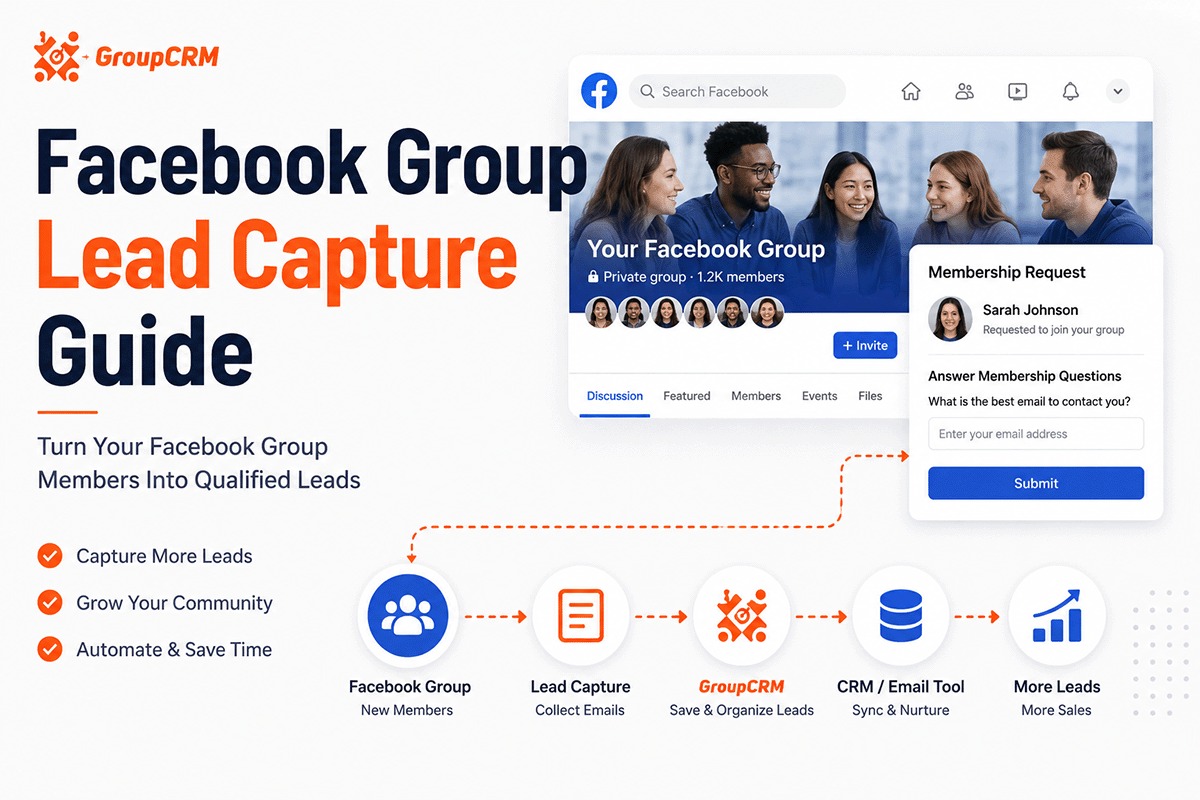
The math: how many leads you are losing
A 5,000-member coaching group might get 15 to 40 join requests per day depending on ads and posts. That is 450 to 1,200 requests per month. If your screening question asks for email and 70 percent of applicants fill it in, that is 315 to 840 emails monthly sitting in Facebook's request queue.
Copy 840 emails by hand at 20 seconds each. That is 4.7 hours per month on data entry alone, before welcome messages or follow-up. Most admins capture a fraction and tell themselves they will "catch up later." They do not.
Lead capture software pulls every request automatically the moment it arrives. You approve on your schedule. The data is already in your CRM or Sheet.
What Facebook shows vs what you can capture
Facebook's native join request UI shows:
- - Name and profile link
- - Answers to your membership questions
- - Sometimes mutual friends (not always visible at a glance)
It does not show email on the profile. It does not export to CSV. It does not score leads.
Tools like GroupCRM read the same request screen your browser sees and pull: profile URL, account age, location (when available), mutual friend count, all screening answers, extracted email and phone from free text, and a computed lead score.
Screening question templates
Use all three Facebook membership questions. Mark each required.
Bad questions produce bad data. "Tell us about yourself" gets one-word answers. Specific questions get answers you can score and filter on.
For coaches
- 1. What is your best email for group updates?
- 2. What is the #1 challenge you want help with in [niche]?
- 3. Are you currently working with a coach? (Yes / No / Looking)
For course creators
- 1. Email address (required for course announcements)
- 2. Which best describes you? (Beginner / Intermediate / Advanced)
- 3. What course or product are you most interested in?
For agencies managing client groups
- 1. Business email
- 2. Company name and role
- 3. What do you hope to get from this community?
Put email in question 1 always. Applicants skim. If email is question 3, completion rates drop.
Email extraction from free text
People do not always paste clean emails. You get "reach me at jane@gmail.com thanks" or "Jane@gmail.com (personal)" or missing domains. Manual copy introduces typos. VAs transpose characters.
Good capture tools run pattern matching on answers to pull valid email addresses and phone numbers. They dedupe across groups so the same person requesting into two of your groups does not create two Sheet rows.
Example payload your tool might store per lead:
{
  "name": "Jane Cooper",
  "email": "jane@gmail.com",
  "phone": null,
  "score": 84,
  "account_age_days": 412,
  "mutual_friends": 3,
  "answers": { "q1": "jane@gmail.com", "q2": "Scaling paid ads" }
}
Lead scoring: building a 0–100 score
Not every request deserves the same attention. Scoring ranks them so you message 80+ first and auto-decline obvious junk.
Common signals and weighting logic:
- + Valid email present (+25 to +35 points)
- + Thoughtful screening answers, not one word (+15 to +25)
- + Account older than 90 days (+10 to +20)
- + Mutual friends with members (+5 per mutual, capped)
- - Spam keywords in answers (heavy penalty or auto-decline)
- - Brand-new account with zero mutuals
Sort your queue by score. Export hot leads to sales the same day. Set a rule to decline under 20 automatically.
Syncing to Google Sheets and webhooks
Google Sheets is still the default export for many admins. One sheet per group keeps client work clean. Columns: name, email, score, date approved, screening answers, profile URL.
Webhooks push JSON to your backend on events: captured, approved, declined, messaged. Example use: POST to Zapier → add ConvertKit subscriber → tag "Facebook group June 2026" → trigger welcome sequence.
GroupCRM fires webhooks on every plan. You are not locked into Zapier if you have a developer or use Make/n8n.
Sample Google Sheet columns we see work well: Timestamp, Full Name, Email, Phone, Score, Group Name, Approved Date, Profile URL, Answer 1, Answer 2, Answer 3, Tags. Keep headers stable so Zapier mappings do not break when you add rows.
Week-by-week rollout plan
Week 1: Fix screening questions. Install capture tool. Manual approve only. Measure how many requests include valid email.
Week 2: Enable capture sync to Sheets. Review data quality daily. Fix question wording if completion rate is under 60 percent.
Week 3: Turn on lead scoring and tags. Train VA or sales on sorting by score.
Week 4: Add auto-approve rules for clear pass cases. Connect email marketing webhook. Measure time saved vs baseline.
Rushing all four in one day creates chaos. Spacing it out lets you catch bad question design before automation amplifies it.
Measuring capture rate
Track three numbers monthly: total join requests, requests with valid email, requests approved. Email capture rate equals valid emails divided by total requests. Aim for 65 to 85 percent on groups that require email in question 1.
If capture rate is low, the fix is usually the question text ("What's your email?" beats "Contact info"). Not the software.
Track lead-to-customer conversion separately. A 90 percent capture rate means nothing if those leads never get followed up. Assign hot scores to sales within 24 hours.
Agency setup for multiple client groups
Agencies should separate client data at the Sheet and webhook level. One webhook endpoint per client or one Zapier zap per group prevents leads leaking into the wrong Mailchimp account.
Use consistent naming: ClientName_GroupName_Sheet. Document which rules each client approved. Some clients want strict filters. Others want permissive approve with email only.
White-label dashboards let clients log into your brand instead of a third-party tool name. Worth it if group management is a billed service line.
Train VAs on one SOP doc: what score threshold gets a sales flag, which Sheet tab is which client, never edit Sheet headers, report spam keywords weekly. Consistency beats heroics.
Consent and compliance basics
Screen questions are your consent mechanism for collecting email. State in group rules that members may receive group-related emails. For marketing blasts beyond group announcements, use double opt-in where required (EU, Canada, etc.).
Keep a record of when someone joined and what they answered. If someone unsubscribes, honor it in your email platform. If someone asks to delete data, remove their row from Sheet and CRM.
This is not legal advice. Talk to a lawyer if you run large lists or regulated industries. The operational point: capture cleanly, tag clearly, unsubscribe promptly.
Connecting to email marketing
Capture is step one. Step two is getting leads into Mailchimp, ConvertKit, ActiveCampaign, or HubSpot with the right tags so you can email them legally and relevantly.
Practical tagging strategy:
- - Tag by group name (so you know which community they joined)
- - Tag by join month (for cohort analysis)
- - Tag hot leads (score 80+) for sales outreach
- - Do not dump everyone into your main newsletter without a welcome sequence
Mention in group rules that providing email means occasional group-related emails. Separate marketing opt-in if your jurisdiction requires it.
Welcome sequence structure that works: email 1 (day 0) points to pinned post, email 2 (day 2) shares best resource, email 3 (day 5) soft offer. Match tone to the group. Community groups feel different from paid-offer groups.
Capture-only vs full pipeline
Capture-only: email lands in Sheet, you do the rest manually. Fine under 100 leads per month.
Full pipeline: capture, score, approve by rules, welcome DM, webhook to CRM, tag in email platform. Needed when leads are revenue-critical and volume is high.
GroupCRM covers the full pipeline. Read our best group leads software guide if you are still picking a tool.
Do not do this
- - Scrape public group posts for emails. Violates Facebook terms and produces low-quality lists.
- - Mass-DM everyone who liked a post. Different feature, same ban risk, worse conversion.
- - Buy email lists "from Facebook groups." Garbage data.
- - Skip screening questions. You capture names, not leads.
- - Let leads sit 7+ days before approval. Intent cools. Approve or decline fast.
Sample workflows that work
Coach with a free group and paid offer
Capture email on join. Score by answer quality. Tag 80+ scores. VA calls or DMs hot leads within 24 hours. Everyone else gets the free community experience. Sheet feeds weekly report for the coach.
Course creator launch week
Temporarily loosen account age rules to accept ad traffic. Tighten keyword blocks. Auto-approve anyone with email and a real sentence in answer 2. Push all approvals to ConvertKit tag "Launch June 2026" and trigger a 5-email nurture.
Agency client group
Strict rules: business email domain preferred, decline free gmail if client wants B2B only. Separate Sheet per client. Weekly PDF summary from Sheet for client check-in calls.
Putting it together
Fix your screening questions. Install capture software. Sync to Sheets or webhooks. Score and tag. Connect email marketing with sensible tags. Auto-approve when rules are tested. Measure capture rate monthly. Do not scrape, do not buy lists, do not let requests rot in the queue.
A 5,000-member group with steady growth can produce hundreds of emails per month you are currently losing. The setup cost is one afternoon. The ongoing cost is a subscription and five minutes a week reviewing rules. The return is leads that actually reach your CRM and your revenue team.
Common questions
How do I capture emails from Facebook group join requests?
Add a membership question that asks for email. Use a Chrome extension or CRM tool to read answers when someone requests to join, extract the email, and sync to Sheets or your email platform. Do not rely on profile data; Facebook rarely shows email on profiles.
Can I capture leads without auto-approving everyone?
Yes. Tools like GroupCRM capture full request data while requests are still pending. You can review, score, and then approve or decline manually or by rules.
What is Facebook group lead scoring?
Lead scoring assigns a number (often 0–100) to each join request based on signals like email presence, answer quality, account age, and mutual friends. You prioritize high scores for outreach and can auto-decline low scores.
Should I use Google Sheets or a CRM for Facebook group leads?
Sheets works for one group and low volume. Multiple groups, tags, segments, and webhooks push you toward a CRM dashboard with Sheets as one export option.
Is it legal to capture emails from Facebook group members?
You should disclose in group rules that joining includes providing contact info for group communications. Follow CAN-SPAM, GDPR, or local rules for marketing emails. Capture only what screening questions collect with consent.